How do 301 redirects in Webflow work?
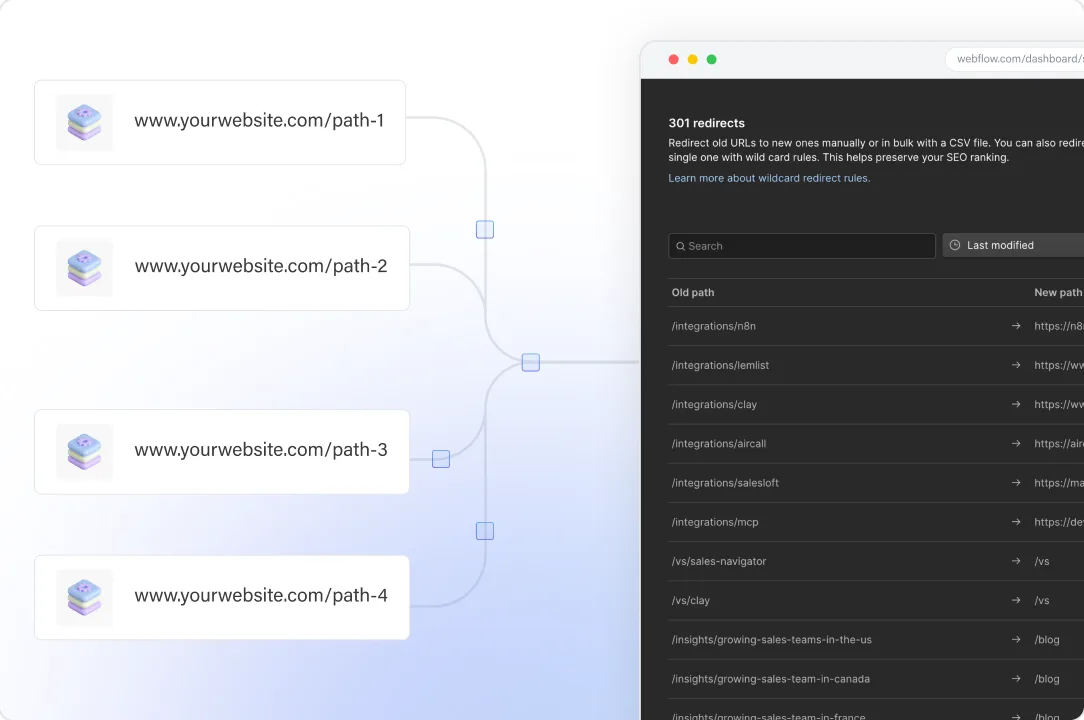
Webflow redirects are permanent 301 redirects stored under Site settings, then Publishing, then 301 redirects. Each redirect rule maps an old path to a new URL, needs a paid Site plan or a paid Workspace plan, and only takes effect after you publish. Webflow checks the rules in the order they were added.
To add one, type the old path in the Old path field, starting with a forward slash, type the new URL in the Redirect to path field, save, and publish. When you change URLs on a Webflow website, this step keeps users and search engines from landing on pages that don't exist anymore. At scale, the details matter. Webflow's help center (updated May 19, 2026) sets these rules:
| Rule | What it means in practice |
|---|---|
| The old path cannot be a live page | Delete the page, save it as a draft, or change its slug first; for Webflow CMS items, archive, unpublish, or change the slug |
| Rules run in the order they were added | The oldest matching rule wins, so a broad wildcard added early can catch URLs meant for a specific rule |
| Paths are relative to the root domain | /old-url and /es/old-url need two rules on a localized site |
| Changes need a publish | Nothing redirects until you publish the site |
| Slug changes can create the rule | In Page settings, "Permanently redirect the old URL to this new one" adds a 301 for static pages |
| Domain moves work differently | Connect both domains, set the new domain as default, and publish |
Do 301 redirects protect your search rankings?
301 redirects protect what can be protected. A 301 tells search engines that a page has moved for good and sends visitors who follow links from other websites to the new location. Google treats 301 and 308 redirects as a signal that the new URL should become the canonical one, while 302 and 307 redirects are not. Rankings and SEO value still depend on the new page matching the old one.
Google's redirect documentation gives no percentage of link equity or SEO value passed through a redirect, so treat figures like that with care. What it does document:
- A server-side redirect has the highest chance of being interpreted correctly, and a 301 is a server-side response.
- Consolidating content from several old pages into one new page is a valid reason to redirect them all there. Sending many old URLs to one URL that is irrelevant, such as the home page, can be treated as a soft 404.
- Keep redirects "for as long as possible, generally at least 1 year."
- Redirects slow users down, so update old links in your navigation, Webflow CMS content, and buttons to point at the new URL directly.
How many redirects can a Webflow site have?
Webflow sets no hard limit on 301 redirects, but its help center recommends 1,000 rules at most as a best practice, because every rule is added to the site's manifest.json file. If you read a different number elsewhere, go by Webflow's current page.
A large migration can pass 1,000 old URLs quickly. Our WordPress to Webflow migration guide describes Surfe's move, where 2,400 pages were redirected, all tested before launch.
Ways to keep the rule count down:
- Replace folder moves with one wildcard redirect each, for example /blog/(.*) to /resources/%1, which covers multiple pages with one rule.
- Skip a URL redirect for old pages with no equivalent, no traffic, and no external links, and let them return a 404.
- Retire old rules with care: remove a rule only after the year Google recommends, and only when its old URL gets no traffic and has no external links.
How do wildcard redirects and capture groups work in Webflow?
Webflow's wildcard redirect is a capture group. Put (.*) in the old path to match any text, then use %1 in the new URL to insert what the first capture group matched. With multiple capture groups, reference the second as %2, the third as %3, and so on. One wildcard redirect can then move multiple URLs at once, such as every blog post in a folder.
| Old path | Redirect to | What happens |
|---|---|---|
| /oldfolder/(.*) | /resources/%1 | /oldfolder/guide-a goes to /resources/guide-a |
| /blogs/(.*)/(.*) | /articles/%1/%2 | Both segments carry over, in order |
| /%?category%=(.*)%&post%=(.*) | /blog/%1/%2 | A query string becomes a clean path |
| %?category%=food | /blog/food | One query string URL goes to one page |
Three common mistakes in bulk imports:
- Escape special characters. Webflow's help center says to put a % before these characters in old paths: %, -, &, *, (, ), =, _, +, and ?. The destination path needs no escaping. Its own single-page example, /old-url, leaves the hyphen unescaped, so test one plain rule and one escaped rule before you import hundreds.
- Trailing slashes before query strings. Webflow strips a forward slash that sits right before a query string, so /slug%?param%=value works and /slug/%?param%=value "will silently fail to fire."
- Rule order. Specific rules must come before a broad wildcard redirect. To double check the order, sort the 301 redirects list by Date created.
Wildcards can also cause redirect loops. A rule from /blog/(.*) to /blog/archive/%1 matches its own target URL, so every request redirects again. Keep the target outside the pattern you match.
What does a CSV import of Webflow redirects overwrite?
A CSV import overwrites everything. Webflow's help center says "new imports overwrite all existing redirects," so a CSV that holds only your new 301 redirects deletes every rule on the entire site. Export first, merge, then import.
A safe workflow for any bulk change:
- Export the current list from Site settings, Publishing, 301 redirects. Webflow sends a notification and an email with the download link.
- Add the new rows to that export. The file needs two columns: the old path and the new URL.
- Remove duplicates, so each old path appears once, and remove rows whose old path is still a live page.
- Put specific rows above wildcard rows.
- Check for chains: no new URL in the file should also appear in the old path column.
- Keep the file under 16 MB. One invalid row fails the whole import, and Webflow emails the file back with guidance on the errors.
- Import, publish, and test.
Keep the export from step 1 as your rollback. Only site managers can delete all 301 redirects at once, and a merged file is easier to review than a list of edits made in Site settings.
How do redirect chains and redirect loops happen, and how do you find them?
Redirect chains build up after repeated URL changes. An old rule still points at the second address, which now redirects again. Google's crawlers follow up to 10 redirect hops, but Google advises redirecting to the final destination directly, or, if you cannot, keeping a chain to ideally no more than 3 hops. Each extra hop is one more request before website visitors see the page.
Common ways a chain forms on a Webflow site:
- A slug changed twice with the redirect option checked, which can leave A to B and B to C.
- Redirects from an earlier redesign that point to pages a later project moved.
- A single rule and a wildcard that both match the same old URL.
To find them, export the CSV and run a lookup in a spreadsheet: for each row, check whether its new URL appears in the old path column. Every match is a chain. Point the first rule straight at the final URL and delete nothing until you have tested. Redirect loops show up the same way, as two rows that point at each other or a wildcard whose target matches its own pattern.
How do you test Webflow redirects and catch broken links after publishing?
Publish, then request every old URL in your 301 redirects list and check three things: a 301 status, a location header with the destination URL, and a 200 response at that URL after a single hop. Test the full list, on the custom domain, not a sample on staging.
A test routine that scales:
- Spot-check a few rules in a browser and from a terminal.
curl -sI https://www.example.com/old-pathshould return a 301 and a location header;curl -sILshows every hop. - Run the whole CSV list through a script or a crawler in list mode, and flag any row with more than one hop, a 404, or a different destination.
- Add the edge cases: URLs with query strings, with and without trailing slashes, localized paths, and uppercase letters. Webflow's help center does not say whether matching is case sensitive, so test it on your site.
- Crawl the live site for broken links: internal links that still point at old URLs, or at URLs with no rule.
- In Google Search Console, inspect the new URL rather than the old one. Google's inspection tools do not follow redirects.
- Watch 404 errors for the following weeks. Our website redesign SEO checklist covers the 90 days after launch.
When should you manage Webflow redirects through the API?
Use the Webflow API when redirects change every week or come from another system, such as a product catalog or a programmatic page set. Webflow's 301 redirect endpoints require an Enterprise workspace and the sites:write scope, and each rule takes a fromUrl, the source URL path, and a toUrl, the target URL path.
The API gives you a source of truth outside Site settings: a spreadsheet or repository that generates rules, logs every change, and can be reviewed before it ships. For most marketing sites below a few hundred rules, the CSV workflow above is enough. If you are weighing an upgrade for this and other controls, see what to check before buying Webflow Enterprise.
We build and migrate Webflow sites for B2B companies, so we have an interest in the topic. If you are planning a move, see our Webflow migration service.
Questions about Webflow redirects
How do I set up a 301 redirect in Webflow?
Open Site settings, go to Publishing, and add the old path and the redirect-to path under 301 redirects. Delete, draft, or rename the old page first, then publish the site.
How many redirects can a Webflow site have?
Webflow says it has no hard limit on redirects, but it recommends 1,000 at most as a best practice, because every rule is added to the site's manifest.json file.
Does importing a redirect CSV delete existing Webflow redirects?
Yes. Webflow's help center says new imports overwrite all existing redirects, so export your current list and add the new rows to it before you import.
How do wildcard redirects work in Webflow?
Put a capture group such as (.*) in the old path and reference it with %1 in the redirect-to path. For example, /oldfolder/(.*) to /resources/%1 moves every page in that folder.
Can you manage Webflow redirects through the API?
Yes, on Enterprise. Webflow's 301 redirect endpoints require an Enterprise workspace and the sites:write scope.
Do 301 redirects hurt SEO?
Not when each old URL points to the most relevant new page in a single hop. Google treats a 301 as a signal that the new URL should be canonical, and recommends keeping redirects for generally at least 1 year.
Sources
- Webflow: How do I set up redirects in Webflow? Accessed October 26, 2026
- Webflow: Import/export 301 redirects Accessed October 26, 2026
- Webflow Developers: Create a 301 redirect Accessed October 26, 2026
- Google Search Central: Redirects and Google Search Accessed October 26, 2026
- Google Search Central: How HTTP status codes, and network and DNS errors affect Google Search Accessed October 26, 2026
- Google Search Central: Site moves with URL changes Accessed October 26, 2026